
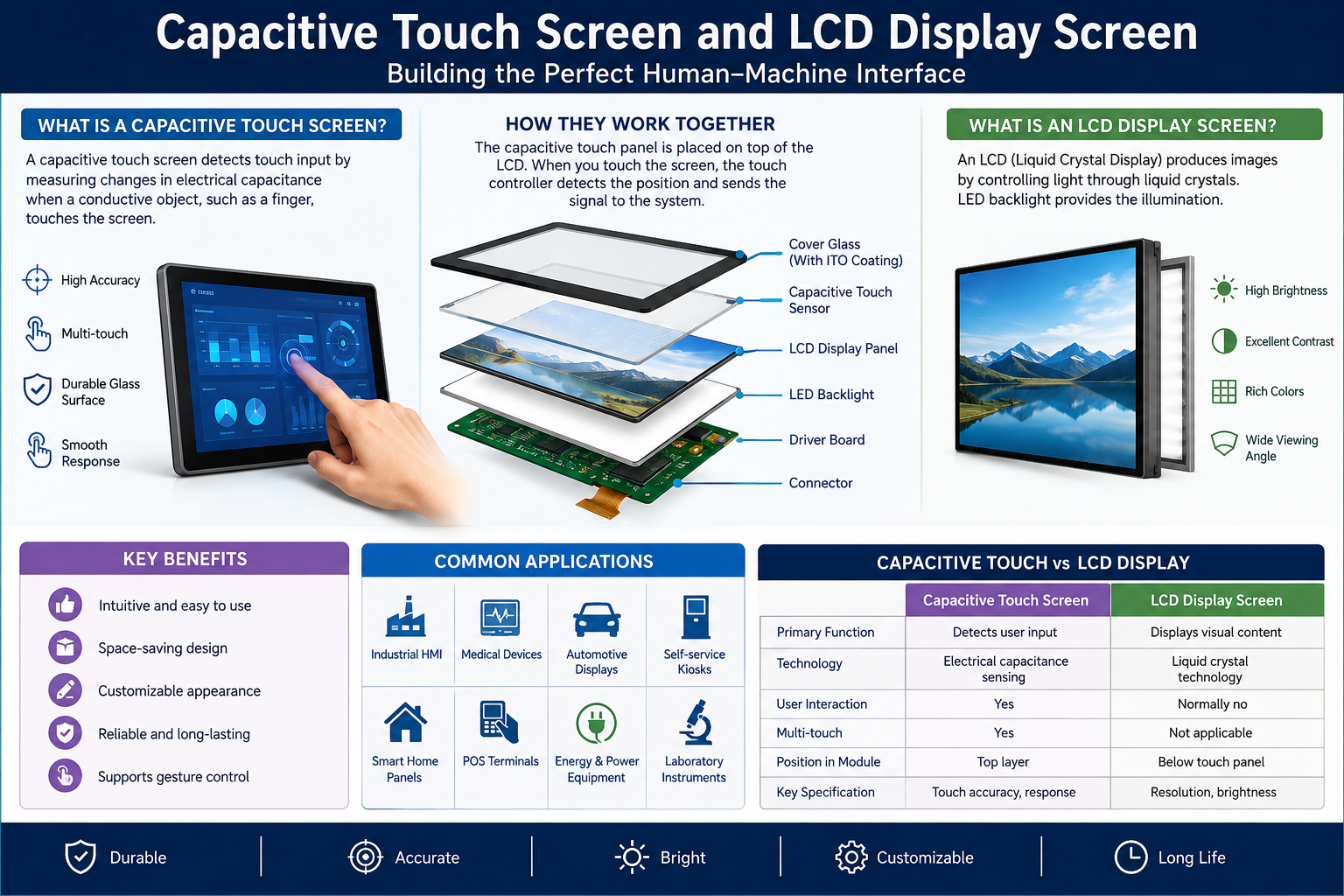
Two important technologies used across consumer electronics, industrial equipment, healthcare systems, automobiles, and smart appliances are the Capacitive Touch Screen and LCD Display Screen. Together, they create an interactive interface that allows users to view information clearly while controlling devices through simple finger gestures.
From smartphones and payment terminals to factory control panels and medical equipment, these technologies have transformed how humans interact with machines. Understanding their features, working principles, advantages, and applications can help manufacturers and buyers select the right display solution for their products.
What Is a Capacitive Touch Screen?
A Capacitive Touch Screen is a touch-sensitive interface that detects changes in an electrical field when a conductive object, usually a human finger, touches its surface. Unlike traditional resistive screens that require physical pressure, capacitive technology responds to light contact.
The screen generally contains a transparent conductive layer positioned beneath protective glass. When the user touches the surface, the electrical charge changes at that location. The touch controller calculates the coordinates and sends the information to the device processor.
Modern capacitive screens provide:
- Fast touch response
- Multi-touch capability
- Smooth gesture control
- Excellent optical clarity
- Durable glass surfaces
- Accurate touch detection
- Support for pinch, zoom, swipe, and rotation
These capabilities make capacitive technology suitable for modern interactive applications.
How Does a Capacitive Touch Screen Work?
A Capacitive Touch Screen operates by creating an electrostatic field across its conductive surface. Human skin conducts electricity, so touching the glass slightly changes the electrical characteristics of the screen.
The system follows a simple process:
- The controller creates an electrical field across the touch panel.
- A finger contacts the glass surface.
- Electrical capacitance changes at the contact point.
- Sensors measure the change.
- The controller calculates the exact touch coordinates.
- The operating system performs the requested command.
Projected capacitive touch technology, commonly called PCAP, is especially popular because it offers excellent sensitivity and supports multiple simultaneous touch points.
What Is an LCD Display Screen?
An LCD Display Screen, or Liquid Crystal Display, uses liquid crystals to control the amount of light passing through individual pixels. Because liquid crystals do not produce their own light, LCD panels normally use LED backlighting.
The display contains several layers, including polarizing filters, liquid crystal material, electrodes, color filters, and a backlight system.
An LCD Display Screen can provide sharp text, detailed graphics, reliable color reproduction, and efficient power consumption. It is widely available in different resolutions, dimensions, brightness levels, viewing angles, and interface configurations.
Common applications include:
- Industrial control equipment
- Smart home appliances
- Automotive dashboards
- Medical instruments
- POS terminals
- Security systems
- Consumer electronics
- Telecommunications equipment
Capacitive Touch Screen and LCD Display Screen Integration
Combining a Capacitive Touch Screen with an LCD Display Screen creates a complete human-machine interface. The LCD presents visual information while the touch panel allows users to interact directly with displayed icons, buttons, menus, and controls.
Manufacturers can integrate the two components using optical bonding or air-gap bonding.
Optical bonding places transparent adhesive between the touch panel and LCD. This reduces internal reflections and can improve outdoor visibility, durability, and visual clarity.
Air-gap bonding maintains a small space between the touch panel and display. It is often more economical and may simplify component replacement.
Key Benefits of Capacitive Touch Technology
The popularity of capacitive interfaces comes from their combination of performance, appearance, and durability.
Important benefits include:
- Highly responsive operation
- Excellent surface transparency
- Modern user experience
- Multi-touch gesture support
- Strong resistance to scratches
- Easy-to-clean glass surface
- Precise coordinate detection
- Long operational lifespan
A properly designed Capacitive Touch Screen can also operate through customized cover glass containing printed logos, decorative borders, icons, and branding elements.
Major Advantages of LCD Display Technology
The LCD Display Screen remains an important display technology because it balances performance, cost, availability, and customization.
Its major advantages include:
| Feature | Benefit |
| High Resolution | Produces clear text and detailed graphics |
| Low Power Use | Suitable for portable and embedded devices |
| Thin Construction | Supports compact product designs |
| Multiple Sizes | Available for small and large applications |
| High Brightness | Suitable for demanding environments |
| Custom Interfaces | Supports different electronic systems |
| Mature Technology | Offers stable manufacturing and availability |
Industrial LCD solutions can additionally provide wide operating temperatures, higher brightness, improved viewing angles, and extended product lifecycles.
Choosing the Right Touch and Display Solution
Selecting the correct Capacitive Touch Screen and LCD Display Screen requires more than choosing dimensions.
Important specifications should be evaluated carefully.
Screen Size and Resolution
Choose a screen size that matches the physical dimensions of the device. Resolution should provide enough detail for the intended interface, graphics, data, and text.
Brightness and Viewing Conditions
Indoor equipment may require moderate brightness, while outdoor kiosks and automotive applications often need high-brightness displays for visibility under sunlight.
Touch Controller Compatibility
The touch controller must communicate reliably with the host system. Common interfaces include USB and I2C.
Cover Glass Requirements
Custom cover glass can be developed with different thicknesses, shapes, colors, logos, printed borders, and surface treatments.
Operating Environment
Industrial applications should consider temperature, humidity, vibration, sunlight exposure, dust, water, and electromagnetic interference before selecting components.
Applications Across Different Industries
The combination of touch and LCD technologies supports numerous industries.
Industrial automation systems use touch displays in control panels and human-machine interfaces. Medical equipment uses them for patient monitoring and diagnostic controls. Automotive systems integrate interactive displays into dashboards, navigation systems, and infotainment units.
Retail businesses use Capacitive Touch Screen technology in POS terminals and self-service kiosks, while smart appliances increasingly use touchscreen interfaces instead of mechanical buttons.
The versatility of an LCD Display Screen also allows designers to develop interfaces ranging from compact handheld devices to large industrial equipment.
Frequently Asked Questions
1. What is a capacitive touch screen?
A Capacitive Touch Screen detects electrical changes created when a conductive object such as a human finger touches its surface.
2. What is an LCD display screen?
An LCD Display Screen uses liquid crystals and backlighting to produce visible images, graphics, and text.
3. Can capacitive touch panels support multi-touch?
Yes. Modern projected capacitive panels can detect multiple touch points simultaneously.
4. Can an LCD work without a touch panel?
Yes. An LCD can operate independently when the application only needs information display.
5. Why combine touch technology with LCD?
The combination creates an interactive interface where users can directly control functions shown on the display.
6. What is optical bonding?
Optical bonding uses transparent adhesive to connect the touch panel directly to the LCD, helping improve clarity and durability.
7. Are capacitive screens durable?
Yes. Their glass surfaces offer strong resistance against normal wear and scratching when properly designed.
8. Can LCD screens be used outdoors?
Yes. High-brightness LCD models with suitable optical treatments are available for outdoor applications.
9. Can touch screens be customized?
Yes. Manufacturers can customize dimensions, cover glass, printing, interfaces, connectors, touch controllers, and other specifications.
10. Which industries commonly use these displays?
They are commonly used in industrial automation, healthcare, automotive systems, retail equipment, home appliances, security devices, and consumer electronics.